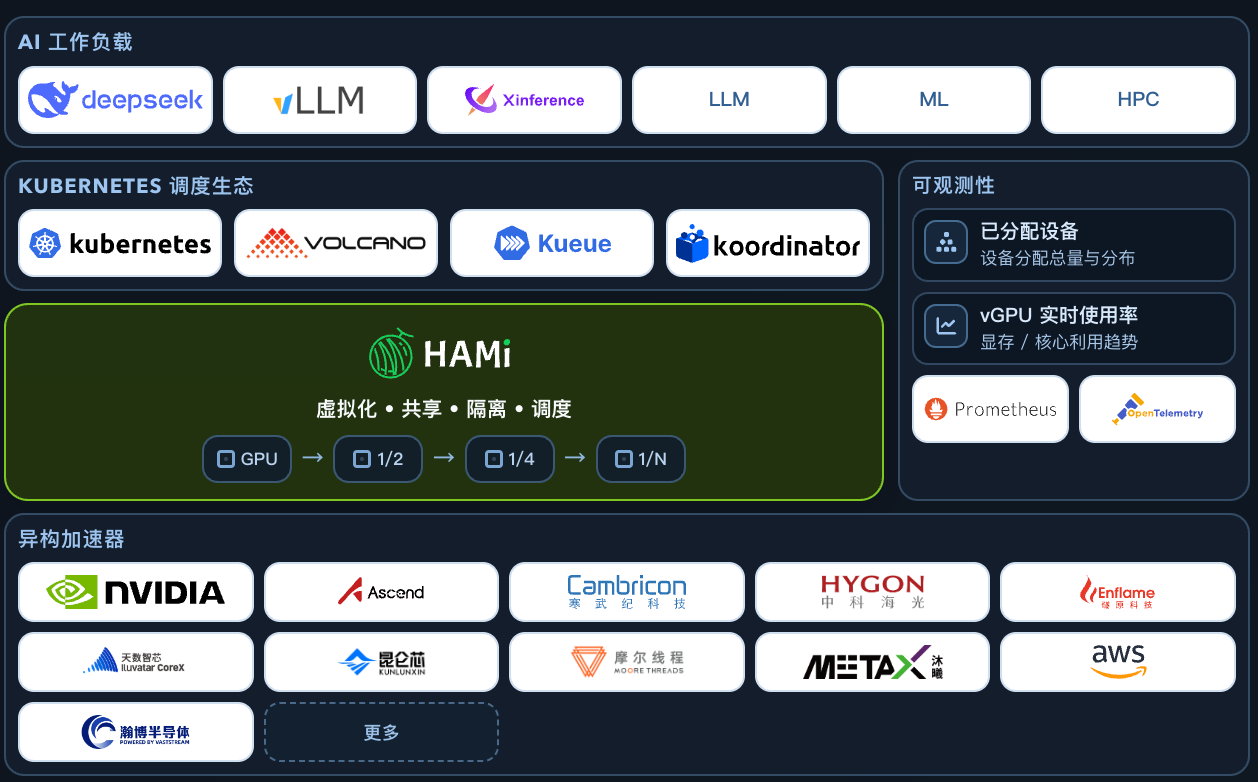
HAMi 是目前 Kubernetes 上最活跃的开源 vGPU 方案,能够将一块物理 GPU 按显存和算力细粒度地切分为多个虚拟 GPU,供不同 Pod 共享。
本文聚焦 HAMi DRA 模式的部署与使用:安装 HAMi DRA 驱动后,分别用原生模式和兼容模式提交 Pod,验证 GPU 切分是否生效。
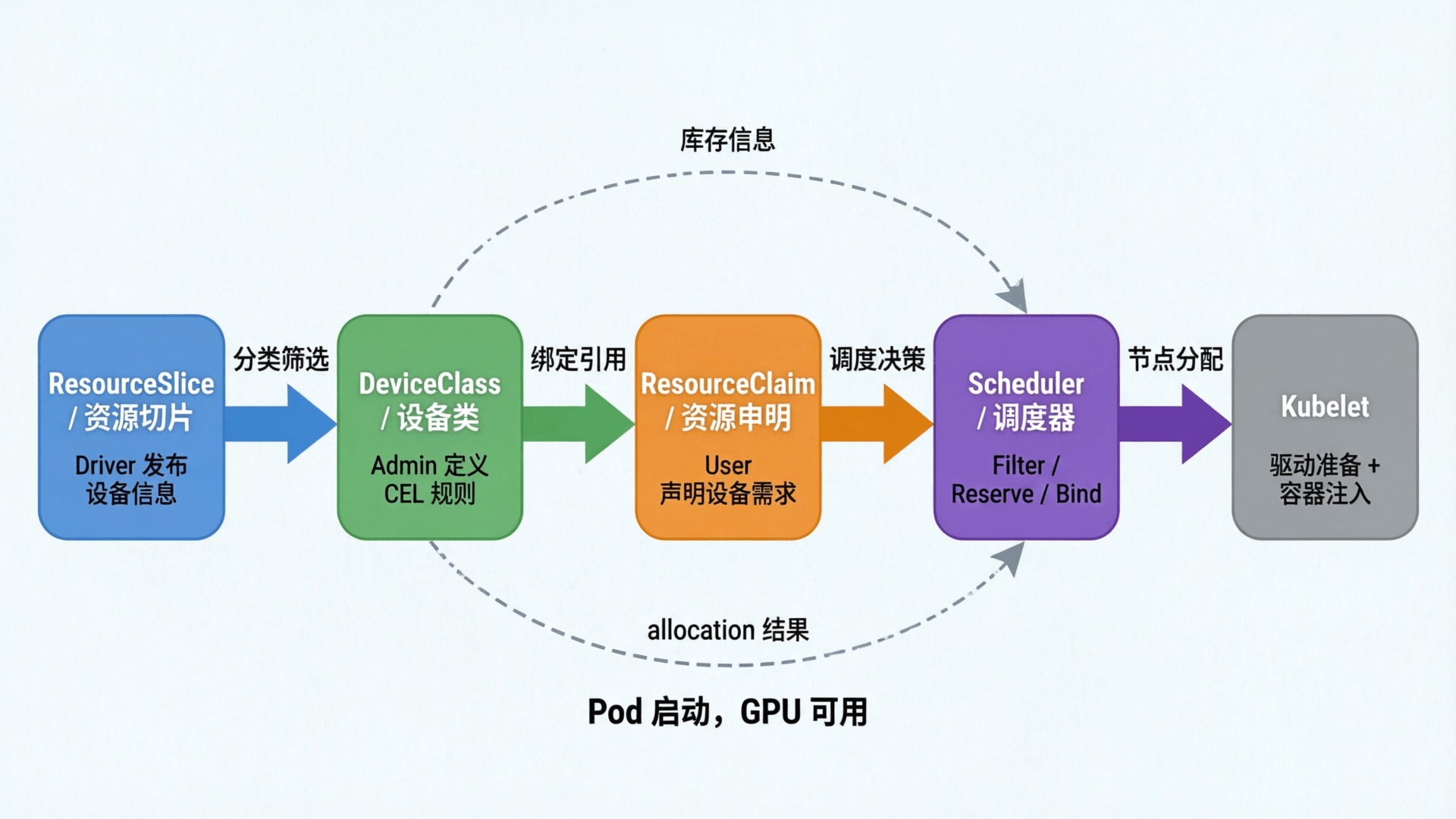
Kubernetes 在 1.34 中正式 GA 了 DRA(Dynamic Resource Allocation,动态资源分配)。DRA 的核心改进是让调度器参与资源分配,在 Pod 调度阶段就精确匹配设备属性,避免了 DevicePlugin “调度到节点后才发现资源不够” 的问题。
HAMi 最近的版本已经正式接入了 DRA ,用户既可以使用原生 DRA 模式,也可以用 DevicePlugin 兼容模式无缝迁移。
什么是 HAMi
HAMi(异构 AI 计算虚拟化中间件)是一个用于管理 Kubernetes 集群中异构 AI 计算设备的开源平台。前身为 k8s-vGPU-scheduler,HAMi 可在多个容器和工作负载之间实现设备共享。
HAMi 是云原生计算基金会(CNCF)的 Sandbox 项目,并被收录于 CNCF 技术全景图和 CNAI 技术全景图。
核心特性
设备共享
多设备支持:兼容多种异构 AI 计算设备(GPU、NPU 等) 共享访问:多个容器可同时共享设备,提高资源利用率 内存管理
硬限制:在容器内强制执行严格的内存限制,防止资源冲突 动态分配:根据工作负载需求按需分配设备内存 灵活单位:支持按 MB 或占总设备内存百分比的方式指定内存分配 设备规格
类型选择:可请求特定类型的异构 AI 计算设备 UUID 定向:使用设备 UUID 精确指定特定设备 易用性
对工作负载透明:容器内无需修改代码 简单部署:使用 Helm 轻松安装和卸载,配置简单 开放治理
社区驱动:由互联网、金融、制造业、云服务等多个领域的组织联合发起 中立发展:作为开源项目由 CNCF 管理 HAMi 安装
前提条件:
特别是第一条,DRAConsumableCapacity 在 1.36 才默认开启,1.34、1.35 需手动配置。
GPU Operator 安装
安装 GPU Operator 时需要关闭 DevicePlugin:
1
2
3
4
5
6
7
8
helm repo add nvidia https://helm.ngc.nvidia.com/nvidia && helm repo update
helm upgrade --install --wait gpu-operator \
\
\
= v26.3.1 \
= true \
= false
--set devicePlugin.enabled=false:关闭 DevicePlugin,避免与后续安装的 DRA Driver 冲突。
安装 cert-manager
HAMi DRA Webhook 需要 TLS 证书,因此需要提前安装 cert-manager 用于自动签发。
1
2
3
4
5
6
helm repo add cert-manager https://charts.jetstack.io
helm repo update
helm install cert-manager cert-manager/cert-manager \
\
= true
Helm 安装 HAMi
为节点打上 gpu=on 标签,未标记的节点不会被 HAMi 接管。
1
2
3
#kubectl label nodes {nodeid} gpu=on
kubectl label nodes ecs-a10-sh gpu = on
使用以下命令添加 HAMi 图表仓库:
1
helm repo add hami-charts https://project-hami.github.io/HAMi/
用以下命令进行安装:
1
2
# 核心是通过 --set dra.enabled=true 开启 DRA 模式
helm -n hami-system install hami hami-charts/hami --set dra.enabled= true --create-namespace
注意 :DRA 模式与传统模式不兼容,请勿同时启用。
另外如果 GPU 驱动是主机预装,非 GPU Operator 安装,则安装时需额外指定:
1
--set hami-dra.drivers.nvidia.containerDriver= false
验证
正常情况下,会在 hami-system 下启动以下 Pod
1
2
3
4
5
root@ECS-A10-SH:/data/nfs/shared-skills-cicd# k -n hami-system get po
NAME                                     READY   STATUS    RESTARTS   AGE
hami-dra-driver-kubelet-plugin-hflbh     1/1     Running   0          2m49s
hami-hami-dra-monitor-7b484d5f95-rlkcg   1/1     Running   0          22m
hami-hami-dra-webhook-64bfdc6b86-d4nlr   1/1     Running   0          22m
使用
查看 ResourceSlice
查看 dra-driver 是否正常发布 resourceslice:
1
2
3
root@ECS-A10-SH:/data/nfs/shared-skills-cicd# kubectl get resourceslice
NAME                                             NODE         DRIVER                          POOL         AGE
ecs-a10-sh-hami-core-gpu.project-hami.io-hnn6d   ecs-a10-sh   hami-core-gpu.project-hami.io   ecs-a10-sh   119s
详情如下:
 1
 2
 3
 4
 5
 6
 7
 8
 9
10
11
12
13
14
15
16
17
18
19
20
21
22
23
24
25
26
27
28
29
30
31
32
33
34
35
36
37
38
39
40
41
42
43
44
45
46
47
48
49
50
51
52
53
root@ECS-A10-SH:/data/nfs/shared-skills-cicd# kubectl get resourceslice ecs-a10-sh-hami-core-gpu.project-hami.io-hnn6d -oyaml
apiVersion: resource.k8s.io/v1
kind: ResourceSlice
metadata:
  creationTimestamp: "2026-05-13T09:28:56Z"
  generateName: ecs-a10-sh-hami-core-gpu.project-hami.io-
  generation: 1
  name: ecs-a10-sh-hami-core-gpu.project-hami.io-hnn6d
  ownerReferences:
  - apiVersion: v1
    controller: true
    kind: Node
    name: ecs-a10-sh
    uid: 76c7db94-fe0b-44ea-9b07-8bdb6132888b
  resourceVersion: "61417761"
  uid: 46d46b45-108e-45e3-98f2-000a091571d3
spec:
  devices:
  - attributes:
      architecture:
        string: Ampere
      brand:
        string: Nvidia
      cudaComputeCapability:
        version: 8.6.0
      cudaDriverVersion:
        version: 12.4.0
      driverVersion:
        version: 550.144.3
      minor:
        int: 0
      pcieBusID:
        string: 0000:65:01.0
      productName:
        string: NVIDIA A10
      resource.kubernetes.io/pcieRoot:
        string: pci0000:64
      type:
        string: hami-gpu
      uuid:
        string: GPU-f1c7d08c-ae21-13e7-0de0-9eb14ff71eaf
    capacity:
      cores:
        value: "100"
      memory:
        value: 23028Mi
    name: hami-gpu-0
  driver: hami-core-gpu.project-hami.io
  nodeName: ecs-a10-sh
  pool:
    generation: 1
    name: ecs-a10-sh
    resourceSliceCount: 1
可以看到,ResourceSlice 记录了 GPU 的架构、型号、显存等信息。
提交任务:DRA 原生模式
DRA 原生使用流程是先创建 ResourceClaim,然后创建 Pod 使用该 ResourceClaim。
提交任务
ResourceClaim 以及对应 Pod 完整 yaml 如下:
 1
 2
 3
 4
 5
 6
 7
 8
 9
10
11
12
13
14
15
16
17
18
19
20
21
22
23
24
25
26
27
28
29
30
31
32
33
34
35
36
# DRA 原生模式 - 手动创建 ResourceClaim
# 申请 10G 显存 + 50 cores 的 A10 GPU
apiVersion : resource.k8s.io/v1
kind : ResourceClaim
metadata :
name : gpu-half-claim
spec :
devices :
requests :
- name : gpu
exactly :
deviceClassName : hami-core-gpu.project-hami.io
allocationMode : ExactCount
count : 1
capacity :
requests :
cores : 50
memory : "10Gi"
---
apiVersion : v1
kind : Pod
metadata :
name : gpu-test-dra-native
spec :
containers :
- name : cuda
image : 172.31.0.2 : 5000 /nvidia/cuda:13.0.1-base-ubi9
command : [ "sleep" , "3600" ]
resources :
claims :
- name : gpu
resourceClaims :
- name : gpu
resourceClaimName : gpu-half-claim
restartPolicy : Never
查看调度情况
通过 ResourceClaim 可以看到资源分配情况:
 1
 2
 3
 4
 5
 6
 7
 8
 9
10
11
12
13
14
15
16
17
18
19
20
21
22
23
24
25
26
27
28
29
30
31
32
33
34
35
36
37
38
39
40
41
42
43
44
45
46
47
root@ECS-A10-SH:~/lixd/deploy/gpu/hami/examples# k get po
NAME                  READY   STATUS    RESTARTS   AGE
gpu-test-dra-native   1/1     Running   0          88s
root@ECS-A10-SH:~/lixd/deploy/gpu/hami/examples# k get resourceclaim
NAME             STATE                AGE
gpu-half-claim   allocated,reserved   21s
root@ECS-A10-SH:~/lixd/deploy/gpu/hami/examples# k get resourceclaim gpu-half-claim -oyaml
apiVersion: resource.k8s.io/v1
kind: ResourceClaim
metadata:
  name: gpu-half-claim
  namespace: default
spec:
  devices:
    requests:
    - exactly:
        allocationMode: ExactCount
        capacity:
          requests:
            cores: "50"
            memory: 10Gi
        count: 1
        deviceClassName: hami-core-gpu.project-hami.io
      name: gpu
status:
  allocation:
    devices:
      results:
      - consumedCapacity:
          cores: "50"
          memory: 10Gi
        device: hami-gpu-0
        driver: hami-core-gpu.project-hami.io
        pool: ecs-a10-sh
        request: gpu
        shareID: 6108e68f-a7ec-4a30-9782-634885c0c728
    nodeSelector:
      nodeSelectorTerms:
      - matchFields:
        - key: metadata.name
          operator: In
          values:
          - ecs-a10-sh
  reservedFor:
  - name: gpu-test-dra-native
    resource: pods
    uid: d99dc6df-092c-4f3a-ac55-cfb88c017af7
效果
Pod 中执行 nvidia-smi 看到显存是我们申请的 10G,说明 HAMi 生效了。
 1
 2
 3
 4
 5
 6
 7
 8
 9
10
11
12
13
14
15
16
17
18
19
20
21
22
23
[ HAMI-core Msg( 51:140707774973760:libvgpu.c:870)] : Initializing.....
Wed May 13 10:58:20 2026
+-----------------------------------------------------------------------------------------+
| NVIDIA-SMI 550.144.03 Driver Version: 550.144.03 CUDA Version: 13.0 |
| -----------------------------------------+------------------------+----------------------+
| GPU Name Persistence-M | Bus-Id Disp.A | Volatile Uncorr. ECC |
| Fan Temp Perf Pwr:Usage/Cap | Memory-Usage | GPU-Util Compute M. |
| | | MIG M. |
| ========================================= +======================== +====================== |
| 0 NVIDIA A10 On | 00000000:65:01.0 Off | 0 |
| 0% 32C P8 22W / 150W | 0MiB / 10240MiB | 0% Default |
| | | N/A |
+-----------------------------------------+------------------------+----------------------+
+-----------------------------------------------------------------------------------------+
| Processes: |
| GPU GI CI PID Type Process name GPU Memory |
| ID ID Usage |
| ========================================================================================= |
| No running processes found |
+-----------------------------------------------------------------------------------------+
[ HAMI-core Msg( 51:140707774973760:multiprocess_memory_limit.c:703)] : Cleanup on exit for PID 51
[ HAMI-core Msg( 51:140707774973760:multiprocess_memory_limit.c:739)] : Exit cleanup complete for PID 51
提交任务:DevicePlugin 兼容模式
原生 DRA 模式需要手动创建 ResourceClaim,对存量业务不够友好。
为了便于大家迁移,HAMi 提供了兼容模式:用户仍然像 DevicePlugin 那样申请资源,由 HAMi DRA Webhook 自动拦截并转换为 ResourceClaim ,调度器分配后再挂载到 Pod。
提交任务
和使用 DevicePlugin 一样,正常在 resources 中申请资源即可:
 1
 2
 3
 4
 5
 6
 7
 8
 9
10
11
12
13
14
15
16
17
18
# 兼容模式 - 按传统方式申请 GPU,HAMi webhook 自动转换为 ResourceClaim
# 申请 1 块 GPU,10Gi 显存 + 50% 算力
apiVersion : v1
kind : Pod
metadata :
name : gpu-test-compatible
spec :
containers :
- name : cuda
image : 172.31.0.2 : 5000 /nvidia/cuda:13.0.1-base-ubi9
command : [ "sleep" , "3600" ]
resources :
limits :
nvidia.com/gpu : 1
nvidia.com/gpumem : 10240
nvidia.com/gpucores : 50
restartPolicy : Never
查看调度情况
HAMi 会根据 nvidia.com/gpumem、nvidia.com/gpucores 自动生成 ResourceClaim,并绑定到 Pod。
对应的 ResourceClaim 如下:
 1
 2
 3
 4
 5
 6
 7
 8
 9
10
11
12
13
14
15
16
17
18
19
20
21
22
23
24
25
26
27
28
29
30
31
32
33
34
35
36
37
38
39
40
41
42
43
44
45
46
47
48
49
50
51
52
53
root@ECS-A10-SH:~/lixd/deploy/gpu/hami/examples# k get resourceclaim
NAME STATE AGE
default-gpu-test-compatible-cuda allocated,reserved 2m47s
root@ECS-A10-SH:~/lixd/deploy/gpu/hami/examples# k get resourceclaim default-gpu-test-compatible-cuda -oyaml
apiVersion : resource.k8s.io/v1
kind : ResourceClaim
metadata :
creationTimestamp : "2026-05-13T11:14:06Z"
finalizers :
- resource.kubernetes.io/delete-protection
name : default-gpu-test-compatible-cuda
namespace : default
resourceVersion : "61451167"
uid : 8212ef37-f71c-45ca-ac4a-f94ead923eef
spec :
devices :
requests :
- exactly :
allocationMode : ExactCount
capacity :
requests :
cores : "50"
memory : "10737418240"
count : 1
deviceClassName : hami-core-gpu.project-hami.io
selectors :
- cel :
expression : device.attributes["hami-core-gpu.project-hami.io"].type ==
"hami-gpu"
name : gpu
status :
allocation :
devices :
results :
- consumedCapacity :
cores : "50"
memory : 10Gi
device : hami-gpu-0
driver : hami-core-gpu.project-hami.io
pool : ecs-a10-sh
request : gpu
shareID : a8dba99f-7841-41ad-9f07-5ec39ddee543
nodeSelector :
nodeSelectorTerms :
- matchFields :
- key : metadata.name
operator : In
values :
- ecs-a10-sh
reservedFor :
- name : gpu-test-compatible
resource : pods
uid : 173a6d7f-665b-4b2d-961c-f550d70f7484
核心配置:
 1
 2
 3
 4
 5
 6
 7
 8
 9
10
spec :
devices :
requests :
- exactly :
allocationMode : ExactCount
capacity :
requests :
cores : "50"
memory : "10737418240"
count : 1
对比原始 Pod 的资源申请:
1
2
3
4
5
resources :
limits :
nvidia.com/gpu : 1
nvidia.com/gpumem : 10240
nvidia.com/gpucores : 50
Webhook 转换映射关系:
原始资源申请 ResourceClaim 字段 nvidia.com/gpu: 1requests.count: 1nvidia.com/gpumem: 10240requests.capacity.memorynvidia.com/gpucores: 50requests.capacity.cores
效果
同样的,显存为 10240M,说明 HAMi 也生效了。
 1
 2
 3
 4
 5
 6
 7
 8
 9
10
11
12
13
14
15
16
17
18
19
20
21
22
23
24
root@ECS-A10-SH:~/lixd/deploy/gpu/hami/examples# k exec -it gpu-test-compatible -- nvidia-smi
[ HAMI-core Msg( 57:139707024262976:libvgpu.c:870)] : Initializing.....
Wed May 13 11:21:39 2026
+-----------------------------------------------------------------------------------------+
| NVIDIA-SMI 550.144.03 Driver Version: 550.144.03 CUDA Version: 13.0 |
| -----------------------------------------+------------------------+----------------------+
| GPU Name Persistence-M | Bus-Id Disp.A | Volatile Uncorr. ECC |
| Fan Temp Perf Pwr:Usage/Cap | Memory-Usage | GPU-Util Compute M. |
| | | MIG M. |
| ========================================= +======================== +====================== |
| 0 NVIDIA A10 On | 00000000:65:01.0 Off | 0 |
| 0% 32C P8 22W / 150W | 0MiB / 10240MiB | 0% Default |
| | | N/A |
+-----------------------------------------+------------------------+----------------------+
+-----------------------------------------------------------------------------------------+
| Processes: |
| GPU GI CI PID Type Process name GPU Memory |
| ID ID Usage |
| ========================================================================================= |
| No running processes found |
+-----------------------------------------------------------------------------------------+
[ HAMI-core Msg( 57:139707024262976:multiprocess_memory_limit.c:703)] : Cleanup on exit for PID 57
[ HAMI-core Msg( 57:139707024262976:multiprocess_memory_limit.c:739)] : Exit cleanup complete for PID 57
小结
本文围绕 HAMi DRA 模式完成了从安装到验证的完整实践:
部署 HAMi DRA :关闭 DevicePlugin 后通过 Helm 安装 HAMi,开启 dra.enabled=trueDRA 原生模式 :手动创建 ResourceClaim 声明显存与算力,Pod 通过 resourceClaim 引用DevicePlugin 兼容模式 :沿用传统 nvidia.com/gpu 等资源申请,HAMi DRA Webhook 自动转换为 ResourceClaim,存量业务零改造即可迁移两种模式的核心差异在于 ResourceClaim 的创建方式——原生模式手动管理、兼容模式自动生成,底层调度与切分逻辑一致。
 意琦行 收录于 Kubernetes