
Qwen3.5 是阿里云最新开源的大语言模型系列,提供了从 0.8B 到 397B 的多种规格,在推理能力和效率之间取得了良好平衡。
面对如此丰富的模型规格,该如何选择?本文将首先分析各规格模型的特点和适用场景,帮助你找到最适合的那一款,然后介绍如何使用 vLLM 在 Kubernetes 环境中部署 Qwen3.5 模型。
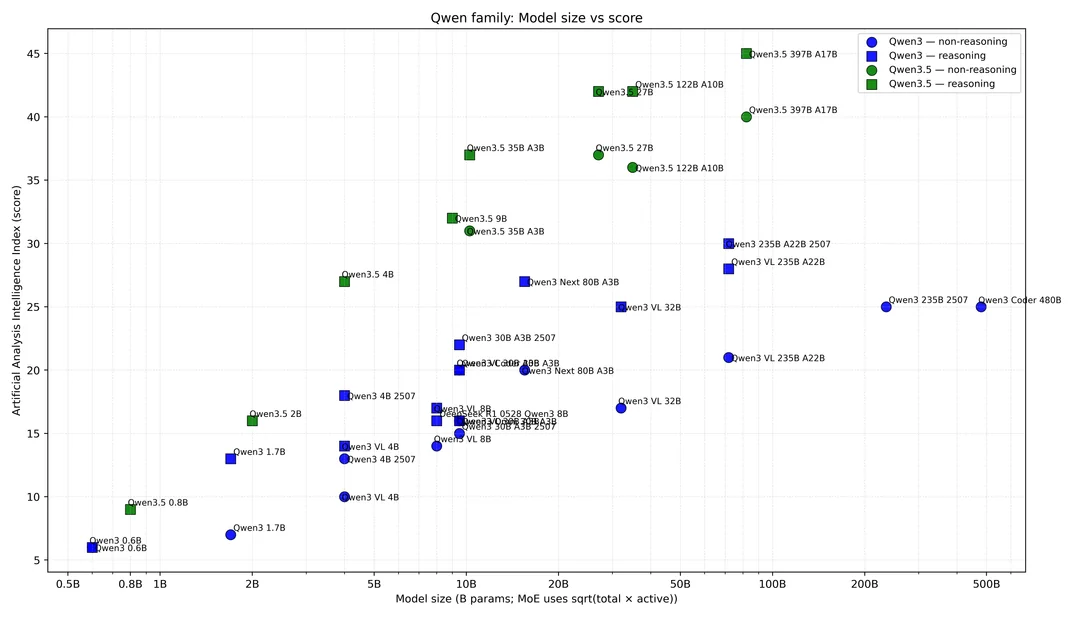
根据各大榜单排名以及实测表现,Qwen3.5 系列在性能和质量的权衡上表现出色。
1. 测试环境
本文所有测试均在以下环境完成:
 1
 2
 3
 4
 5
 6
 7
 8
 9
10
11
12
13
14
15
16
| +-----------------------------------------------------------------------------------------+
| GPU Name Persistence-M | Bus-Id Disp.A | Volatile Uncorr. ECC |
| Fan Temp Perf Pwr:Usage/Cap | Memory-Usage | GPU-Util Compute M. |
|=========================================+========================+======================|
| 0 NVIDIA GB200 On | 00000008:01:00.0 Off | 0 |
| N/A 42C P0 395W / 1200W | 175750MiB / 189471MiB | 0% Default |
+-----------------------------------------+------------------------+----------------------+
| 1 NVIDIA GB200 On | 00000009:01:00.0 Off | 0 |
| N/A 42C P0 369W / 1200W | 175366MiB / 189471MiB | 0% Default |
+-----------------------------------------+------------------------+----------------------+
| 2 NVIDIA GB200 On | 00000018:01:00.0 Off | 0 |
| N/A 41C P0 354W / 1200W | 175366MiB / 189471MiB | 0% Default |
+-----------------------------------------+------------------------+----------------------+
| 3 NVIDIA GB200 On | 00000019:01:00.0 Off | 0 |
| N/A 42C P0 375W / 1200W | 179133MiB / 189471MiB | 0% Default |
+-----------------------------------------+------------------------+----------------------+
|
2. 模型选择
Qwen3.5 已形成从 0.8B 到 397B 的完整开源矩阵,分为三大梯队:
| 系列 | 模型 | 特点 |
|---|
| 轻量稠密系列 | 0.8B / 2B / 4B / 9B / 27B | 全参数激活,部署简单,适合个人/边缘场景 |
| 中型 MoE 系列 | 35B-A3B / 122B-A10B | 激活参数小,速度快成本低,适合企业级服务 |
| 旗舰 MoE 系列 | 397B-A17B | 开源旗舰,全场景最强,对标闭源第一梯队 |
所有模型均支持视觉-语言多模态输入,原生上下文长度 256K tokens,最高可扩展至 1M tokens。
根据官方测评数据,比较推荐下面 4 个规格:
| 模型 | 激活参数 | 综合能力 | 代码能力 | Agent 能力 | 中文能力 |
|---|
| Qwen3.5-27B | 27B | 88.5 | HumanEval 89.1 | BFC-Lv4 48.5% | 90.5 |
| Qwen3.5-35B-A3B | 3B | 89.7 | HumanEval 87.9 | BFC-Lv4 52.3% | - |
| Qwen3.5-122B-A10B | 10B | 90.8 | HumanEval 88.7 | BFC-Lv4 50.7% | 91.7 |
| Qwen3.5-397B-A17B | 17B | 91.5 | HumanEval 89.3 | BFC-Lv4 49.8% | 92.3 |
选型建议:
- Qwen3.5-27B:稠密架构最强,代码能力出色(HumanEval≈89.1,稠密代码第一),部署简单,适合代码/工程场景
- Qwen3.5-35B-A3B:Agent/深度推理最强(BFC-Lv4≈52.3%,全系列最高),激活仅 3B,性价比极高
- Qwen3.5-122B-A10B:接近旗舰性能,知识密集/多模态/视频场景优选,成本比旗舰低 40%
- Qwen3.5-397B-A17B:开源旗舰,综合能力开源第一(对标 GPT-5.2),中文能力最强(92.3),支持 1M 上下文无损,适合企业级基座
3. 模型下载
3.1 安装 HuggingFace CLI
首先安装 HuggingFace CLI 工具用于下载模型:
1
| curl -LsSf https://hf.co/cli/install.sh | bash
|
常见问题:安装失败
如果遇到 No module named pip 错误,通常是因为虚拟环境损坏:
1
2
3
4
5
| # 删除损坏的虚拟环境
rm -rf /root/.hf-cli/venv
# 重新安装
curl -LsSf https://hf.co/cli/install.sh | bash
|
3.2 下载模型
Qwen3.5 提供多种规格和精度版本,根据你的硬件配置选择:
1
2
| # INT4 版本(推荐:显存占用低)
hf download Qwen/Qwen3.5-397B-A17B-GPTQ-Int4 --local-dir /raid/lixd/models/Qwen/Qwen3.5-397B-A17B-GPTQ-Int4
|
4. Kubernetes 部署
官方文档:https://docs.vllm.ai/projects/recipes/en/latest/Qwen/Qwen3.5.html
以下以 Qwen3.5-397B-A17B-GPTQ-Int4 为例,展示如何在 Kubernetes 中部署:
 1
 2
 3
 4
 5
 6
 7
 8
 9
10
11
12
13
14
15
16
17
18
19
20
21
22
23
24
25
26
27
28
29
30
31
32
33
34
35
36
37
38
39
40
41
42
43
44
45
46
47
48
49
50
51
52
53
54
55
56
57
58
59
60
61
62
63
64
65
66
67
68
69
70
71
72
73
74
75
76
77
| # qwen35-397b-deployment.yaml
apiVersion: apps/v1
kind: Deployment
metadata:
name: vllm-qwen35-397b
namespace: default
spec:
replicas: 1
selector:
matchLabels:
app: vllm-qwen35-397b
template:
metadata:
labels:
app: vllm-qwen35-397b
spec:
nodeSelector:
kubernetes.io/hostname: gb200-pod2-f06-node05
containers:
- name: vllm-server
image: vllm/vllm-openai:cu130-nightly
command: ["/bin/bash"]
args:
- "-c"
- |
vllm serve /Qwen3.5-397B-A17B-GPTQ-Int4 \
--served-model-name qwen3.5 \
--port 8000 \
--tensor-parallel-size 4 \
--gpu-memory-utilization 0.85 \
--reasoning-parser qwen3 \
--enable-auto-tool-choice \
--max-model-len 262144 \
--tool-call-parser qwen3_coder \
--enable-prefix-caching \
--quantization moe_wna16 \
--host 0.0.0.0 \
--api-key "your-api-key"
resources:
limits:
nvidia.com/gpu: 4
memory: "400Gi"
cpu: "32"
requests:
nvidia.com/gpu: 4
memory: "200Gi"
cpu: "16"
ports:
- containerPort: 8000
name: http
volumeMounts:
- name: model-storage
mountPath: /Qwen3.5-397B-A17B-GPTQ-Int4
readOnly: true
- name: shm
mountPath: /dev/shm
volumes:
- name: model-storage
hostPath:
path: /raid/lixd/models/Qwen3.5-397B-A17B-GPTQ-Int4
type: Directory
- name: shm
emptyDir:
medium: Memory
sizeLimit: 64Gi
---
apiVersion: v1
kind: Service
metadata:
name: vllm-qwen35-397b-service
spec:
selector:
app: vllm-qwen35-397b
ports:
- port: 8000
targetPort: 8000
type: ClusterIP
|
关键参数说明:
| 参数 | 说明 |
|---|
--tensor-parallel-size | 张量并行数,通常等于 GPU 数量 |
--reasoning-parser qwen3 | 启用 Qwen3 推理能力 |
--tool-call-parser qwen3_coder | 使用 Qwen3 工具调用解析器 |
--enable-auto-tool-choice | 启用自动工具选择 |
--quantization moe_wna16 | MoE 模型量化方式 |
--max-model-len 262144 | 最大上下文长度 |
--enable-prefix-caching | 启用前缀缓存加速 |
5. 服务验证
5.1 基础验证
 1
 2
 3
 4
 5
 6
 7
 8
 9
10
11
12
13
14
15
16
| # 查看可用模型列表
curl http://localhost:8000/v1/models \
-H "Authorization: Bearer your-api-key"
# 基础对话测试
curl http://localhost:8000/v1/chat/completions \
-H "Content-Type: application/json" \
-H "Authorization: Bearer your-api-key" \
-d '{
"model": "qwen3.5",
"messages": [
{"role": "user", "content": "你好,请介绍一下你自己"}
],
"max_tokens": 100,
"temperature": 0.7
}'
|
5.2 思考模式控制
Qwen3.5 支持开启/关闭思考模式:
开启思考模式(默认):
 1
 2
 3
 4
 5
 6
 7
 8
 9
10
11
12
| curl http://localhost:8000/v1/chat/completions \
-H "Content-Type: application/json" \
-H "Authorization: Bearer your-api-key" \
-d '{
"model": "qwen3.5",
"messages": [
{"role": "system", "content": "You are a helpful assistant."},
{"role": "user", "content": "Summarize Qwen3.5 in one sentence."}
],
"temperature": 1,
"max_tokens": 4096
}'
|
关闭思考模式:
 1
 2
 3
 4
 5
 6
 7
 8
 9
10
11
12
13
| curl http://localhost:8000/v1/chat/completions \
-H "Content-Type: application/json" \
-H "Authorization: Bearer your-api-key" \
-d '{
"model": "qwen3.5",
"messages": [
{"role": "system", "content": "You are a helpful assistant."},
{"role": "user", "content": "Summarize Qwen3.5 in one sentence."}
],
"temperature": 1,
"max_tokens": 4096,
"chat_template_kwargs": {"enable_thinking": false}
}'
|
6. 性能基准测试
6.1 测试方法
使用 vLLM 内置的 benchmark 工具进行测试:
 1
 2
 3
 4
 5
 6
 7
 8
 9
10
| vllm bench serve \
--model /Qwen3.5-397B-A17B-GPTQ-Int4 \
--served_model_name qwen3.5 \
--dataset-name random \
--random-input 8000 \
--random-output 1024 \
--request-rate 10 \
--num-prompts 32 \
--trust-remote-code \
--ignore-eos
|
6.2 INT4 版本测试结果
 1
 2
 3
 4
 5
 6
 7
 8
 9
10
11
12
13
14
15
16
17
18
19
20
21
22
23
24
25
| ============ Serving Benchmark Result ============
Successful requests: 32
Failed requests: 0
Request rate configured (RPS): 10.00
Benchmark duration (s): 32.58
Total input tokens: 256000
Total generated tokens: 32768
Request throughput (req/s): 0.98
Output token throughput (tok/s): 1005.85
Peak output token throughput (tok/s): 1152.00
Peak concurrent requests: 32.00
Total token throughput (tok/s): 8864.01
---------------Time to First Token----------------
Mean TTFT (ms): 308.19
Median TTFT (ms): 287.37
P99 TTFT (ms): 494.26
-----Time per Output Token (excl. 1st token)------
Mean TPOT (ms): 29.54
Median TPOT (ms): 29.62
P99 TPOT (ms): 30.58
---------------Inter-token Latency----------------
Mean ITL (ms): 29.54
Median ITL (ms): 28.52
P99 ITL (ms): 30.89
==================================================
|
关键指标解读:
| 指标 | 含义 | 测试结果 |
|---|
| TTFT | Time To First Token,首 token 延迟 | 平均 308ms |
| TPOT | Time Per Output Token,每个 token 生成时间 | 平均 29.5ms |
| 吞吐量 | Output token throughput | 1005 tok/s |
7. 小结
本文详细介绍了使用 vLLM 部署 Qwen3.5 模型的完整流程:
- 模型选择:根据需求,推荐选择 27B、35B-A3B、397B-A17B 几种规格
- Kubernetes 部署:k8s 中通过 Deployment 配置,支持多 GPU 张量并行
- 性能表现:INT4 版本在 GB200*4 环境下达到 1005 tok/s 的吞吐量
如果你想在 Claude Code 中使用本地部署的模型,可以参考我的另一篇文章《Claude Code 也能跑本地模型?CCR 多模型智能路由》,了解如何通过 Claude Code Router 实现对接。
另外,如果你对 GLM-5 模型的部署感兴趣,也可以参考《vLLM + GLM-5:打造高性能本地大模型推理服务》。
 意琦行
意琦行