
GLM-5 是智谱 AI 最新发布的大语言模型,具备强大的推理能力和工具调用能力。本文将详细介绍如何使用 vLLM 框架在生产环境中部署 GLM-5 模型。
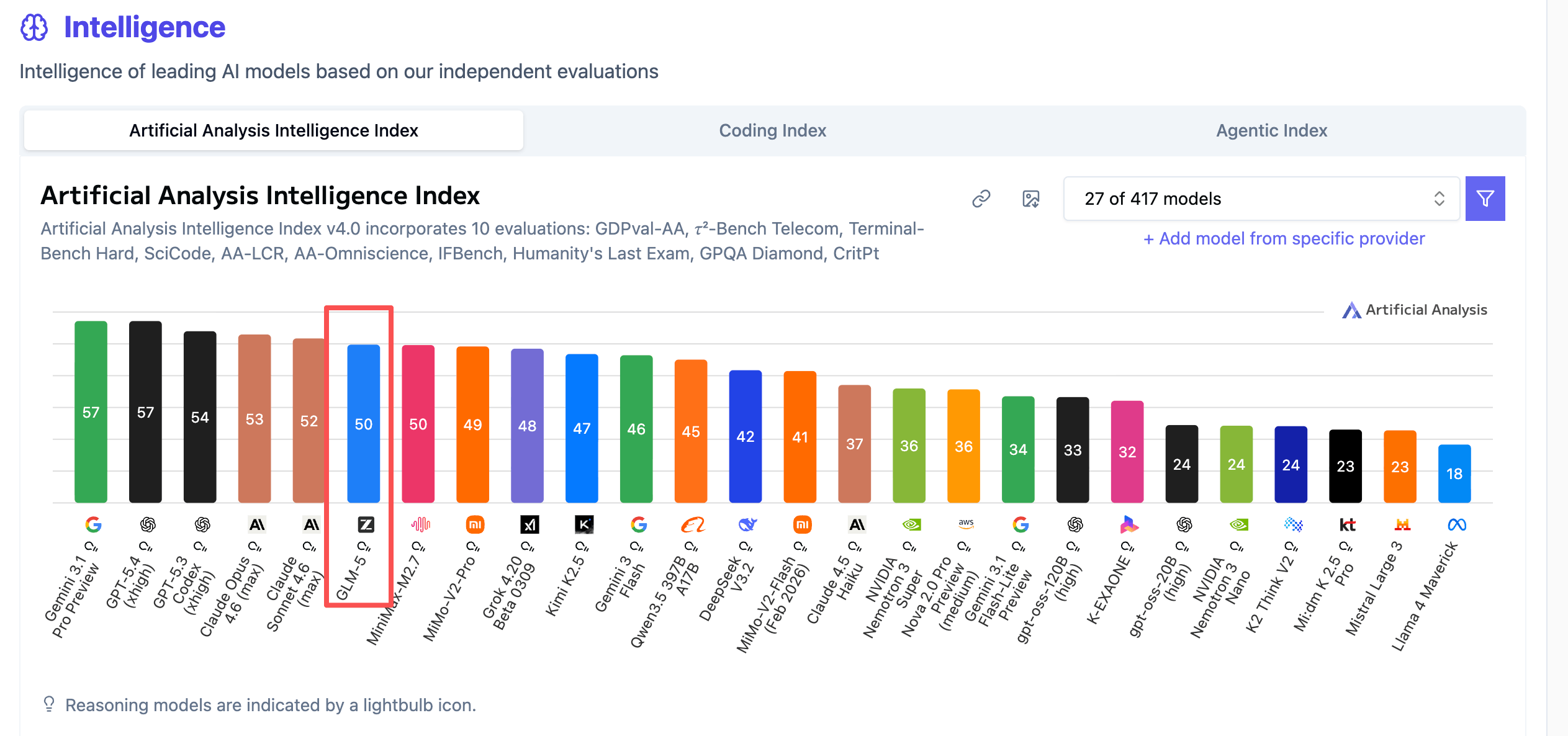
根据各大榜单排名以及实测表现,GLM-5 在多项评测中表现出色,是当前开源模型中的佼佼者。
本文涵盖以下内容:
- 模型下载:FP8 和 INT4 两种量化版本
- 镜像构建:构建支持 GLM-5 的 vLLM 镜像
- Docker 部署:INT4 版本快速部署
- 性能测试:INT4 版本基准测试
0.测试环境
本文所有测试均在以下环境完成:
 1
 2
 3
 4
 5
 6
 7
 8
 9
10
11
12
13
14
15
16
| +-----------------------------------------------------------------------------------------+
| GPU Name Persistence-M | Bus-Id Disp.A | Volatile Uncorr. ECC |
| Fan Temp Perf Pwr:Usage/Cap | Memory-Usage | GPU-Util Compute M. |
|=========================================+========================+======================|
| 0 NVIDIA GB200 On | 00000008:01:00.0 Off | 0 |
| N/A 42C P0 395W / 1200W | 175750MiB / 189471MiB | 0% Default |
+-----------------------------------------+------------------------+----------------------+
| 1 NVIDIA GB200 On | 00000009:01:00.0 Off | 0 |
| N/A 42C P0 369W / 1200W | 175366MiB / 189471MiB | 0% Default |
+-----------------------------------------+------------------------+----------------------+
| 2 NVIDIA GB200 On | 00000018:01:00.0 Off | 0 |
| N/A 41C P0 354W / 1200W | 175366MiB / 189471MiB | 0% Default |
+-----------------------------------------+------------------------+----------------------+
| 3 NVIDIA GB200 On | 00000019:01:00.0 Off | 0 |
| N/A 42C P0 375W / 1200W | 179133MiB / 189471MiB | 0% Default |
+-----------------------------------------+------------------------+----------------------+
|
1. 模型下载
1.1 安装 HuggingFace CLI
首先安装 HuggingFace CLI 工具用于下载模型:
1
| curl -LsSf https://hf.co/cli/install.sh | bash
|
常见问题:安装失败
如果遇到 No module named pip 错误,通常是因为虚拟环境损坏:
1
2
3
4
5
| # 删除损坏的虚拟环境
rm -rf /root/.hf-cli/venv
# 重新安装
curl -LsSf https://hf.co/cli/install.sh | bash
|
1.2 下载模型
GLM-5 提供了多种精度版本,根据你的硬件配置选择:
1
2
3
4
5
| # FP8 版本 - 推荐 H200*8 配置
hf download zai-org/GLM-5-FP8 --local-dir /raid/lixd/models/glm5-fp8
# INT4 量化版本 - 推荐 A100/H100*4 配置
hf download Intel/GLM-5-int4-mixed-AutoRound --local-dir /raid/lixd/models/glm5-int4-mixed-autoround
|
2. vLLM 部署
官方文档:https://github.com/vllm-project/recipes/blob/main/GLM/GLM5.md
2.1 构建自定义镜像
由于 GLM-5 需要最新版 transformers 支持,官方镜像暂未包含,需要构建自定义镜像。
创建 Dockerfile:
 1
 2
 3
 4
 5
 6
 7
 8
 9
10
11
12
| FROM vllm/vllm-openai:v0.17.1-cu130
# 安装 git 用于从源码安装 transformers
RUN apt-get update && apt-get install -y git && \
rm -rf /var/lib/apt/lists/*
# 安装最新版 transformers(GLM-5 需要)
RUN pip install --no-cache-dir git+https://github.com/huggingface/transformers.git
WORKDIR /app
ENTRYPOINT ["vllm"]
|
构建镜像:
1
| docker build -t vllm/vllm-openai:glm5 .
|
已推送到公共仓库:lixd96/vllm-openai:v0.17.1-cu130,可直接拉取使用
2.2 Docker 部署
 1
 2
 3
 4
 5
 6
 7
 8
 9
10
11
12
13
14
15
16
17
18
| docker run -d \
--name vllm-glm5 \
--runtime nvidia \
--gpus '"device=0,1,2,3"' \
-p 8000:8000 \
-v /raid/lixd/models/glm5-int4-mixed-autoround:/app/model \
--shm-size 16g \
vllm/vllm-openai:glm5 \
serve /app/model \
--tensor-parallel-size 4 \
--tool-call-parser glm47 \
--reasoning-parser glm45 \
--enable-auto-tool-choice \
--served-model-name glm5 \
--trust-remote-code \
--gpu-memory-utilization 0.85 \
--host 0.0.0.0 \
--port 8000
|
关键参数说明:
| 参数 | 说明 |
|---|
--tensor-parallel-size | 张量并行数,通常等于 GPU 数量 |
--tool-call-parser glm47 | 使用 GLM 系列工具调用解析器 |
--reasoning-parser glm45 | 启用 GLM 推理能力 |
--enable-auto-tool-choice | 启用自动工具选择 |
--trust-remote-code | 信任模型中的远程代码 |
--gpu-memory-utilization | GPU 显存利用率,建议 0.85-0.95 |
3. 服务验证
3.1 基础验证
部署完成后,验证服务是否正常运行:
 1
 2
 3
 4
 5
 6
 7
 8
 9
10
11
12
13
14
15
16
17
18
19
20
21
22
23
24
25
26
| # 查看可用模型列表
curl http://localhost:8000/v1/models
# 基础对话测试
curl http://localhost:8000/v1/chat/completions \
-H "Content-Type: application/json" \
-d '{
"model": "glm5",
"messages": [
{"role": "user", "content": "你好,请介绍一下你自己"}
],
"max_tokens": 100,
"temperature": 0.7
}'
# 流式对话测试
curl http://localhost:8000/v1/chat/completions \
-H "Content-Type: application/json" \
-d '{
"model": "glm5",
"messages": [
{"role": "user", "content": "用一句话解释什么是 Kubernetes"}
],
"max_tokens": 200,
"stream": true
}'
|
3.2 思考模式控制
GLM-5 支持开启/关闭思考模式,通过 chat_template_kwargs 参数控制:
开启思考模式(默认):
 1
 2
 3
 4
 5
 6
 7
 8
 9
10
11
| curl http://localhost:8000/v1/chat/completions \
-H "Content-Type: application/json" \
-d '{
"model": "glm5",
"messages": [
{"role": "system", "content": "You are a helpful assistant."},
{"role": "user", "content": "Summarize GLM-5 in one sentence."}
],
"temperature": 1,
"max_tokens": 4096
}'
|
关闭思考模式:
 1
 2
 3
 4
 5
 6
 7
 8
 9
10
11
12
| curl http://localhost:8000/v1/chat/completions \
-H "Content-Type: application/json" \
-d '{
"model": "glm5",
"messages": [
{"role": "system", "content": "You are a helpful assistant."},
{"role": "user", "content": "Summarize GLM-5 in one sentence."}
],
"temperature": 1,
"max_tokens": 4096,
"chat_template_kwargs": {"enable_thinking": false}
}'
|
4. 性能基准测试
4.1 测试方法
使用 vLLM 内置的 benchmark 工具进行测试:
 1
 2
 3
 4
 5
 6
 7
 8
 9
10
11
| # Prompt-heavy benchmark (8k input / 1k output)
vllm bench serve \
--model /app/model \
--served_model_name glm5 \
--dataset-name random \
--random-input 8000 \
--random-output 1024 \
--request-rate 10 \
--num-prompts 32 \
--trust-remote-code \
--ignore-eos
|
4.2 INT4 版本测试结果
 1
 2
 3
 4
 5
 6
 7
 8
 9
10
11
12
13
14
15
16
17
18
19
20
21
22
23
24
25
| ============ Serving Benchmark Result ============
Successful requests: 32
Failed requests: 0
Request rate configured (RPS): 10.00
Benchmark duration (s): 35.27
Total input tokens: 256000
Total generated tokens: 32768
Request throughput (req/s): 0.91
Output token throughput (tok/s): 929.09
Peak output token throughput (tok/s): 1088.00
Peak concurrent requests: 32.00
Total token throughput (tok/s): 8187.65
---------------Time to First Token----------------
Mean TTFT (ms): 144.10
Median TTFT (ms): 139.03
P99 TTFT (ms): 226.47
-----Time per Output Token (excl. 1st token)------
Mean TPOT (ms): 31.61
Median TPOT (ms): 31.70
P99 TPOT (ms): 31.80
---------------Inter-token Latency----------------
Mean ITL (ms): 31.61
Median ITL (ms): 31.92
P99 ITL (ms): 58.34
==================================================
|
关键指标解读:
| 指标 | 含义 | 测试结果 |
|---|
| TTFT | Time To First Token,首 token 延迟,衡量用户等待第一个响应的时间 | 平均 144ms,响应迅速 |
| TPOT | Time Per Output Token,每个 token 的生成时间,反映流式输出的流畅度 | 平均 31.6ms |
5. 小结
本文详细介绍了使用 vLLM 部署 GLM-5 模型的完整流程:
- 模型下载:提供 FP8 和 INT4 两种版本,按需选择
- 镜像构建:由于 GLM-5 需要最新 transformers,需自定义镜像
- Docker 部署:以 INT4 版本为例,快速部署模型服务
- 性能表现:INT4 版本在 GB200*4 环境下达到 929 tok/s 的吞吐量
如果你想在 Claude Code 中使用本地部署的 GLM-5 模型,可以参考我的另一篇文章《Claude Code 也能跑本地模型?CCR 多模型智能路由》,了解如何通过 Claude Code Router 实现对接。
 意琦行
意琦行